
Rendering/PBR: Difference between revisions
Added information about prm maps and added a pbr rendering example from shadow generations |
mNo edit summary |
||
| (2 intermediate revisions by the same user not shown) | |||
| Line 30: | Line 30: | ||
</gallery>In the Hedgehog Engine 2 games, PBR properties can be altered either by the Parameter map (_prm) when the material shader supports it (has the letter "p" in its name) or through a "PBRFactor" parameter in the surface's material if the shader being used doesn't support Parameter maps. '''The layout of these Parameter maps varies depending on the game and the shader.''' | </gallery>In the Hedgehog Engine 2 games, PBR properties can be altered either by the Parameter map (_prm) when the material shader supports it (has the letter "p" in its name) or through a "PBRFactor" parameter in the surface's material if the shader being used doesn't support Parameter maps. '''The layout of these Parameter maps varies depending on the game and the shader.''' | ||
All textures/maps used to create the final rendered image<gallery widths="140" heights="140"> | |||
All textures/maps used to create the final rendered image:<gallery widths="140" heights="140"> | |||
File:Ark platform albedo.webp|Albedo maps | File:Ark platform albedo.webp|Albedo maps | ||
File:Ark platform normal b.webp|Normal maps | File:Ark platform normal b.webp|Normal maps | ||
File:Ark platform parameter.webp|Parameter maps | File:Ark platform parameter.webp|Parameter maps | ||
File:Ark platform emission.webp|Emission maps | File:Ark platform emission.webp|Emission maps | ||
</gallery>Final rendered image | </gallery>Final rendered image with added lighting: | ||
[[File:Ark platform.webp|center|thumb|250x250px]] | [[File:Ark platform.webp|center|thumb|250x250px]] | ||
Latest revision as of 20:49, 5 November 2025
These principles only apply to Hedgehog Engine 2 games (Mario & Sonic at the Rio 2016 Olympic Games and onward)[edit | edit source]
PBR (Physically Based Rendering) refers to the current approach to 3D graphics material rendering used in most modern games. Its goal is to enhance the realism of surfaces by reflecting and refracting light more accurately than previous techniques. This is most noticeable in any kind of metallic surface:

PBR rendering tends to not make use of Diffuse maps and Specular Color Maps that were very common in non-PBR rendering. Instead, the primary texture maps it uses in their place are: Albedo Maps, Metallic Maps, Roughness Maps and Ambient Occlusion Maps.
Albedo Maps differ from Diffuse Maps by generally not containing any kind of depth or lighting information.
-
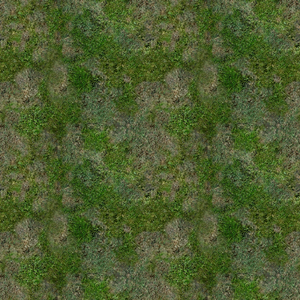 Diffuse texture example
 -
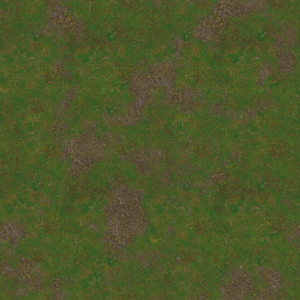 Albedo texture example


Metallic Maps contain values ranging from 0-1(black-white). 0 determines a non-metallic surface while 1 determines a metallic surface. Values in between can and are used for stylistic and/or artistic purposes.

Roughness Maps change how the surface reflects light by making the reflection sharper using a value of 0 (smoother surface) or blurrier/more diffuse using a value of 1 (rough surface). This more or less equals the inverse of typical Gloss Maps used in non-PBR rendering.

Ambient Occlusion maps determine what areas of the surface should occlude more light when not directly illuminated. 0 represents the most light occlusion and 1 represents no light occlusion.

non-PBR vs PBR rendering (same lighting conditions):
-
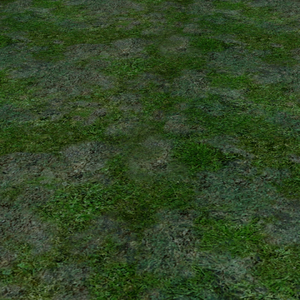 Grass from Sonic The Hedgehog (2006) rendered in Blender
 -
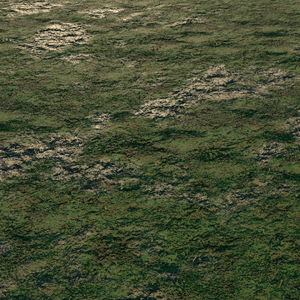 Grass from Shadow Generations rendered in Blender


In the Hedgehog Engine 2 games, PBR properties can be altered either by the Parameter map (_prm) when the material shader supports it (has the letter "p" in its name) or through a "PBRFactor" parameter in the surface's material if the shader being used doesn't support Parameter maps. The layout of these Parameter maps varies depending on the game and the shader.
All textures/maps used to create the final rendered image:
-
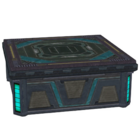 Albedo maps
 -
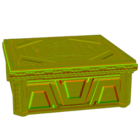 Normal maps
 -
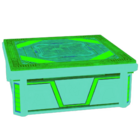 Parameter maps
 -
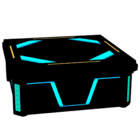 Emission maps


Final rendered image with added lighting:
